Videoguider
Hantera innehållskortets inställningar i Lyyli
Håll ordning på status, ansvar, innehållstyp och tidsplan i inställningspanelen på ett innehållskort i Lyyli.
Transkription
Hi, I'm Mikko. Clear card settings keep everyone on the same page about what's happening and who owns the next step. Let's open this card from the Contents board.
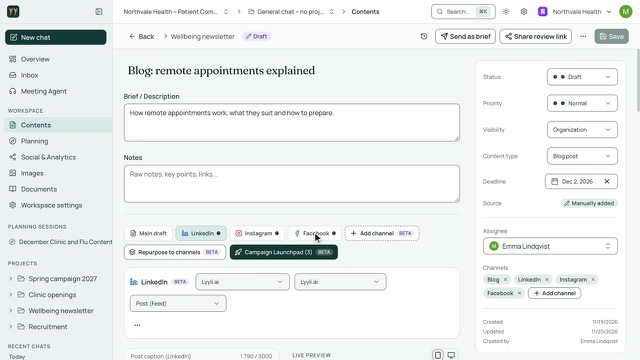
On the right is the settings panel, with Save sitting right at the top. We'll leave the writing itself for another video and start with Status. Status decides which column this card appears in on the Contents board, so keeping it current keeps our view accurate. Next, let's check Priority and Content type.
I use Priority to show what needs attention first, and Content type to label the format we're producing. From here, I'll move down to Visibility and Assignee.
Visibility lets me keep an early idea Private or share it with the Organization, while Assignee makes it clear who's handling it. Now let's look at Deadline and Source.
Adding a Deadline puts the card onto our calendar, and Source records how it started, like when it's manually added. Below that, let's check Channels. Under Channels, I see the linked channels and can click Add channel for more. At the bottom, Created, Updated, and Created by show the card's trail. Now I'll click Save.
Clicking Save stores the updates. Later, once we change Status to Published, we can also save the Publish URL right on the card. Let's check what to watch next. Try these settings on your own cards, and to see the writing workflow, watch From brief to finished draft on one content card next.
Om videon
Tydliga kortinställningar hjälper teamet att hålla koll på vad som pågår, när arbetet ska vara klart och vem som har nästa steg. Öppna inställningspanelen från Contents-tavlan och ange Status, Priority och Content type.
Välj Private eller Organization som synlighet, utse en ansvarig under Assignee och lägg till deadline och källa. Kontrollera kanalerna och lägg till fler med Add channel, se när kortet skapades och uppdaterades, spara och lägg till en Publish URL när statusen är Published.