
Lyyli
One change needs dozens of messages for different audiences. Lyyli keeps the whole under control.
When the organisation changes, leadership, HR and communications must see the same picture. You need to know exactly what each audience is told, when you communicate and who owns each part. Lyyli brings messages, ownership, schedules, comments and approvals into one shared workflow.
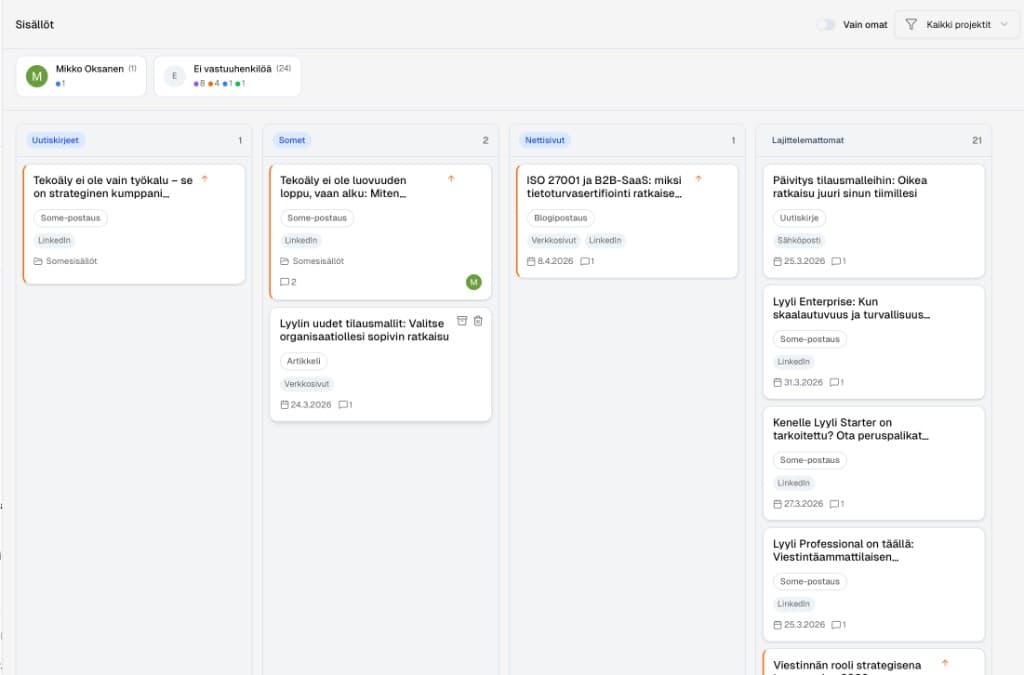
Change communication without scattered email threads
Change rarely fails because of a weak strategy. It fails more often because communications fragment. One leadership decision creates manager guides, staff updates, intranet news, Q&A materials and stakeholder letters. Lyyli acts as a communications operations system where a decision becomes a clear plan, shared tasks and approved content for each audience.
Who is this built for?
Communications leaders, HR teams, change leads and leadership teams who want every party to share the same status view and every message to leave reviewed.
How change communication moves in Lyyli
- 1
Capture the decision and goal
Log the change as a project with goals. If the decision came from a meeting, Meeting Agent can pull key communications needs and decision points straight onto the workspace.
- 2
Define audiences and channels
Split the programme into clear parts for different audiences, such as managers, all staff, customers and media.
- 3
Set ownership and schedules
Create tasks, name owners and set deadlines in calendar or Kanban. The whole team sees progress at a glance.
- 4
Build content and Q&A materials
Produce and refine message versions to brand and guidance. Discussion, edits and feedback stay with the content itself, not in separate threads.
- 5
Approve and publish
Check facts with HR and leadership, approve final versions with an audit trail and take ready material to your organisation's own publishing channels.
Practical example: organisational change for three audiences
The leadership team approves a new operating model. HR and communications need one shared view of how the change is opened to managers, employees and key partners.
1
Decision and goal
The change is opened as a project. Goals, schedules and ownership are visible to the whole team immediately.
2
Audience-specific content
Each audience gets its own content, such as manager background material, a staff update and a stakeholder letter. A change FAQ is built in the same view.
3
Review and comments
HR checks substance and communications owns tone. With a protected review link, experts outside the team can also comment on texts directly in the workflow.
4
Approval and publishing
The Professional approval process ensures every version gets the review it needs before sharing to intranet, email or Teams.
Why leadership and HR value Lyyli
The full picture stays intact
See in real time which messages are ready, which await comments and whose desk holds the next action.
Less email rally
Comments, version history and revisions stay with the right content.
A safe, controlled process
Audit trail records approvals. Publishing decisions and ownership always stay with a human.
Change communication in email vs. Lyyli
| Stage | Traditional model (email and chat) | Lyyli workflow |
|---|---|---|
| Audiences | Messages and versions spread across threads | All audiences and channels in one plan |
| Ownership | Unclear who does what | Named owners, clear tasks and deadlines |
| Q&A and questions | Scattered in personal notes | Shared, living material |
| Approval | "Does this work for everyone?" message rally | Clear approval process and verifiable audit trail |
See how your organisation's communications look from the outside
A free communication analysis reviews your organisation's public web content and highlights observations about brand voice, message themes and consistency. You receive a report by email in about three minutes.
Run a free communication analysisFrequently asked questions
- How can external experts or managers review materials?
- You can share a protected review link for people who do not have access to the full system. They can read and comment on the draft in the browser without a separate login process.
- Does Lyyli replace our current channels, such as intranet or Teams?
- No. Lyyli is the platform for planning, preparation and approval. Once texts and materials are approved, they are taken to your organisation's existing channels for publishing.
- How is AI used in change communication?
- AI supports the work. It can help summarise communications needs from meeting notes, draft versions for different audiences or build Q&A lists. A human always owns checking, approving and publishing the content.
Related pages
Want to see what a shared communications workflow could look like for your team?
Book a demo and we will walk through how Lyyli fits your communications team's day-to-day work.