
Lyyli
Approve messages without email threads
When feedback, versions and decisions stay with the content, the team does not have to dig through email to find the latest version or who gave final approval. Lyyli keeps commenting, versions and approval as part of the same communications work.
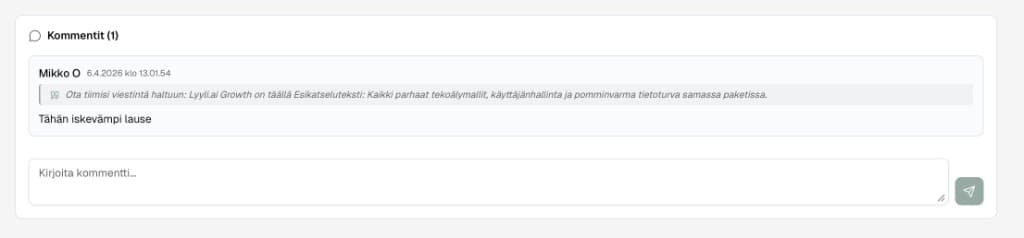
What does the approval process cover?
Lyyli supports comments on the content card, a URL-based review link, version history, and on Professional an approval process and audit trail. Approval belongs with the content, not a separate thread.
Who this is for
Communications teams where several people write, comment and approve. Built for organisations that want less email traffic before content is taken to existing publishing channels.
How approval moves
- 1
Create or move content onto a card
- 2
Collect comments on the same card
- 3
Share a URL-based review link when needed
- 4
Approve content in the Professional process
- 5
Take the approved version to your organisation's existing publishing channels
Example scenario: approve an update without email chaos
A specialist drafted a staff update. A manager and legal need a comment round before it is shared.
Card
Content in one place
The draft lives on a content card. Versions, brief and owner stay in the same view. No Word attachments scattered across threads.
Comments
Feedback on the card
Manager and legal leave comments on the content. The writer sees what to change without losing the latest version in email.
Review
URL review when needed
If an external expert joins, share a review link in Lyyli's workflow. Commenting stays in the process, not in a separate tool.
Decision
Approval on Professional
The approval process and audit trail are included on Professional. The approved version is taken to your organisation's existing publishing channels.
Approval should not be archaeology
You see what is approved and what is waiting. The audit trail helps trace changes in the approval process. Admin and Member roles define who manages the workspace.
Typical use cases
Comments without email threads
Comments stay on the card. Versions and decisions do not get lost in separate messages.
External review link
Share a URL-based review when needed. The approval process is included on Professional in the documented scope.
Audit trail for leadership
You see what is approved. We do not claim a technical lock to every channel or forever retention of every change.
Approval in email vs. Lyyli
Approval belongs with the content, not in a separate thread.
| Lyyli | ||
|---|---|---|
| Comments | Scattered threads | On the same card |
| Versions | Attachments | Version history on the card |
| Decision | Unclear latest message | Approval on Professional |
| Publishing | No process | Take the approved version to the destination |
FAQ
- Is approval mandatory before publishing?
- The approval process is included on Professional. Publishing happens in your organisation's existing channels, and Lyyli does not technically lock every channel.
- What does the audit trail include?
- The audit trail records key steps in the approval process in Lyyli's workflow. It is not a permanent archive of every change.
- How does this relate to project management?
- Projects and Kanban show work status. Approval happens on the content card. See the project management page.
Related pages
Want to see what a shared communications workflow could look like for your team?
Book a demo and we will walk through how Lyyli fits your communications team's day-to-day work.