
Lyyli
The decision happened in a meeting. Communications work can start right away.
Meeting Agent helps identify communication-relevant decisions, topics and follow-ups from meetings and bring them to the communications team for review. The team decides what becomes a task, who owns it and how it moves forward.
What is Meeting Agent?
Meeting Agent is Lyyli's meeting feature. It joins Google Meet, Microsoft Teams or Zoom from your calendar, transcribes the discussion, identifies speakers and surfaces communication proposals. A human approves or rejects each proposal. Approved proposals can move into content cards in the workflow.
Who Meeting Agent is for
Communications teams and directors whose important decisions and communication needs arise in meetings. Available on Growth and Professional. Growth includes 5 hours per month. Professional includes 30 hours.
How a meeting becomes communications work
- 1
Invite Meeting Agent from the calendar to Meet, Teams or Zoom
- 2
The agent transcribes the discussion and builds a summary
- 3
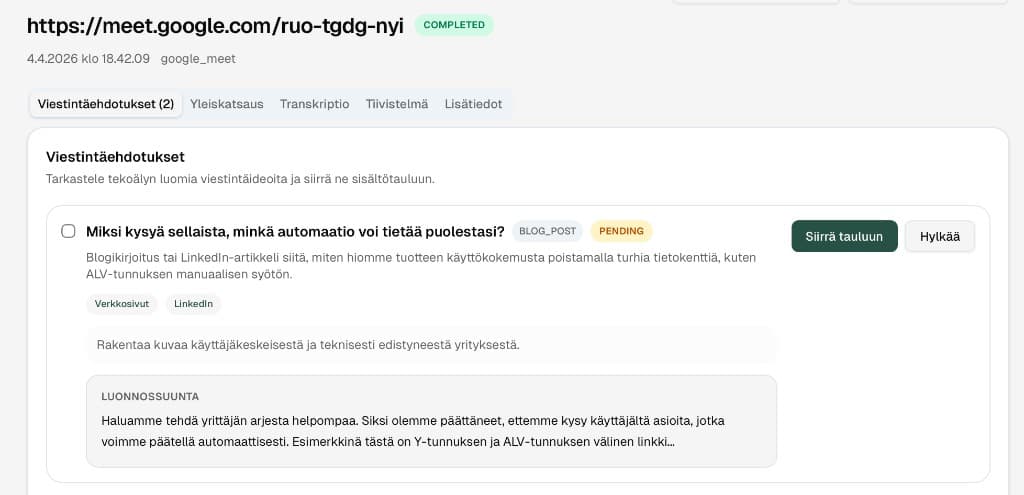
It surfaces communication proposals for team review
- 4
Approve or reject proposals. Approved ones become content cards
- 5
Continue planning, production and approval in Lyyli. Take finished content to your organisation's existing publishing channels
Example scenario: from leadership meeting to internal update
Leadership decides on an organisational change that needs a staff update, a manager briefing and a stakeholder message. Instead of remembering the need later from email or meeting notes, it can move straight into the shared work queue.
Before
Meeting Agent in the calendar
The communications lead invites Meeting Agent to a Google Meet call from the calendar. The agent joins and transcribes the discussion.
During
Proposals appear automatically
The agent builds a summary and surfaces proposals: an internal staff update, a manager briefing and a possible FAQ. People review them in one place.
After
Approve into content cards
The team accepts the staff update and manager briefing, rejects an unnecessary social post. Accepted items become content cards in Kanban with owners and deadlines.
Export
Approved content to channels
Drafts are refined in the organisation voice, commented on the card and approved on Professional. Finished text is taken to your organisation's existing publishing channels, such as the intranet or a Teams update.
Why meetings are often a source of communications debt
Decisions happen in meetings, but follow-up often stays in notes, chat or one person's responsibility. Communication needs from meetings do not stay trapped in notes: Meeting Agent makes needs visible, and the team decides what moves forward. The agent does not publish automatically.
Typical use cases
Leadership decision to internal message
A decision appears in a meeting. Meeting Agent surfaces a proposal, the team accepts it as a content card and assigns owners by audience.
Project sync to a multichannel set
One meeting yields proposals for an internal update, a social post and a newsletter. Each branch continues on its own card.
Clear communications debt from notes
Proposals do not stay in Teams chat or personal notes. They appear in a shared workspace ready for review.
Meeting Agent vs. transcription alone
Transcription helps you remember. Meeting Agent helps you run communications work.
| Transcription only | Meeting Agent | |
|---|---|---|
| Output | A text file | Communication proposals to review |
| Next step | Manual extraction | Approve or reject, move to a content card |
| Ownership | Unclear | Workflow in Kanban and calendar |
| Publishing | No process | Approve in Lyyli, take to destination platform |
FAQ
- Does Meeting Agent publish to channels?
- No. The agent transcribes and proposes. Your team approves proposals, finishes the content and takes it to your organisation's existing publishing channels.
- Which meeting services are supported?
- Google Meet, Microsoft Teams and Zoom via calendar invite.
- How much Meeting Agent capacity is included?
- Growth: 5 hours per month. Professional: 30 hours per month.
- Is Teams Idea Collector the same feature?
- No. Meeting Agent is live for meetings. Teams Idea Collector is a separate roadmap feature.
Related pages
Want to see what a shared communications workflow could look like for your team?
Book a demo and we will walk through how Lyyli fits your communications team's day-to-day work.
One decision becomes communications work
A decision happens in a meeting. Meeting Agent turns it into communication proposals; the team moves the best ideas into production and approves on-brand channel versions without an email rally.
Decision in the meeting
A line or decision emerges in the leadership team's Teams, Meet or Zoom meeting.
AI identifies communication needs
Meeting Agent extracts key themes from the conversation and turns them directly into communication proposals.
Ideas straight into production
The communications team picks the best proposals and moves them into production with one click.
Ownership and channel versions in one go
From one idea, writers, timelines and on-brand versions for different channels build in the same view.
Comments and approval without an email rally
Feedback, revisions and formal approval from the team and leadership stay on the content card.
Ready communications for channels
Reviewed, polished content is ready to share with the right audiences.